Client business
needs to generate and send the statements with outstanding balance to their
customers. Oracle eBS provides the functionality to generate the statement from
‘Receivables’ application:
Receivables >
Print Documents > Statements
However, the
output generated by the program (AR Customer Balance Statement Letter) needs to
be formatted as per the business standard layout and additionally the output
needs to be emailed to the customers based on the registered contacts.
Following
section describes the seeded process and the constraints around the extension
to cater the requirements.
Once the
application user enters the statement data from the ‘Print Statement’ form and
‘Submit’ the program, it submits the ‘Statement Generation Program’ concurrent
request.
This is a
‘Spawn’ process and it populates the temp tables based on the data entered by
the user in the form.
Finally it
submits the ‘AR Customer Balance Statement Letter’. This is a java concurrent
program which executes the query in the temp table and generates the PDF output
as per Oracle defined template. The SQL query is attached as a XML data
template in its data definition in ‘XML Publisher Administrator’.
The data in
the temp table is purged once the process is completed.

The navigation to Submit Customer Statement Print Documents -> Statements
Select the Operating Unit and then Select Cycle and Statement Date and Click Submit. It actually Submits AR Customer Balance Statement Program

The program is submitted in all installed languages concurrently.
To fulfill the requirement, following customizations
are required:
1. Create a new
custom XML data template to include the new field ‘EMAIL_ID’ for the customer
contact.
2. Create a
bursting control file so that the output PDF is split based on the ‘EMAIL_ID’.
3. Upload the
custom XML data template and the bursting control file to the data definition
of the concurrent program ‘AR Customer Balance Statement Letter’ (identified by
the short name ‘ARCUSBALSL’).
4. Create a new
rich text template (RTF) based on the proposed layout and upload the document
to XML template related to the above data definition.
Thus the ‘AR
Customer Balance Statement Letter’ will be submitted by the seeded process but
it will execute the query in the custom data template and generate the output
as per the custom layout. The bursting program will split and send the email to
the intended recipients.
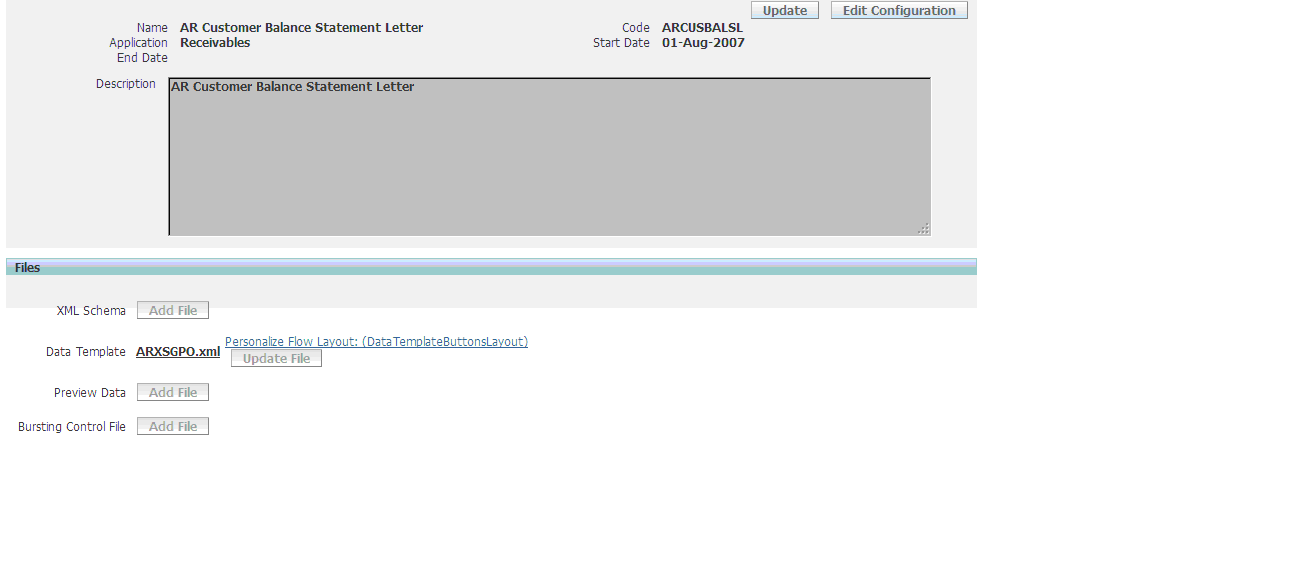
Oracle has
restricted to upload any custom data template or bursting control file against
the data definition ‘ARCUSBALSL’. Thus generic customization approach stated in
above section can not be done in this case.
A
parallel custom process (like ‘XXX AR Customer Balance Statement Letter’) can
not be designed because it can’t be executed alone. It has to be submitted by the
parent program ‘Statement Generation Program’, spawned from the ‘Print
Statement’ form to generate all the data required for the report.
Since there
was no alternative, the technical team has completed a PoC by altering seeded
Oracle process which violates the Oracle standard practice of implementation.
This section
highlights the steps to be done to implement the solution:
1. Create a
custom data definition (XX_ARCUSBALSL) and add new RTF layout.
2. Download the
XML data template ARXSGPO.xml and Save it as XX_ARXSGPO.xml.
-
Modify to add the new field ‘EMAIL_ID’ element
-
Add code in “beforeReport” trigger to update the
template name in the table FND_CONC_PP_ACTIONS for the current request id.
UPDATE
FND_CONC_PP_ACTIONS
SET argument1 = 'XXCUSTOM'
,argument2 = 'XX_ARCUSBALSL'
WHERE action_type = 6
AND concurrent_request_id = P_CONC_REQUEST_ID;
SET argument1 = 'XXCUSTOM'
,argument2 = 'XX_ARCUSBALSL'
WHERE action_type = 6
AND concurrent_request_id = P_CONC_REQUEST_ID;
By updating the FND_CONC_PP_ACTIONS table you ask Post Processor to pickup the custom Data Definitions and Templates
XXCUSTOM is the Custom Application Name
-
Add the code “AfterReport” trigger to execute the
bursting program.
3. Create a
bursting control file for sending email.
4. Attach the
‘XML data template’ and ‘Bursting Control File’ with the data definition XX_ARCUSBALSL.
5. Now ARCUSBALSL
(‘AR Customer Balance Statement Letter’) executes the java class oracle.apps.xdo.oa.cp.JCP4XDODataEngine
(executable name XDODTEXE) .
Create a new java class XXJCP4XDODataEngine to call the custom data
definition ‘XX_ARCUSBALSL’ instead of the seeded data template.
Create a new executable XX_XDODTEXE with the new java program and
attach it with the seeded concurrent program ‘ARCUSBALSL’.
6. Thus the
seeded ‘Statement Generation Program’ will invoke the ‘AR Customer Balance
Statement Letter’ and this will execute the query in the custom XML data
template to create desired PDF files which will be emailed by the bursting
program.
The approach
described above does not alter any process in ‘Statement Generation Program’.
It is only altering the mechanism of producing output; yet there are some
potential risks in this solution.
1. The
executable of the seeded concurrent program ‘ARCUSBALSL’ is changed to a custom
executable – so this can be reverted after the patch application.
2. New
functionality will not be available after patch application since ‘ARCUSBALSL’
will be executing a custom query. Although this is not much relevant since for
a custom report (which is a copy of seeded report with extended functionality)
is never upgraded with the patch application.
3. Oracle
Support may not be available for this program.
1. A script
will be provided which can be executed as a post patching activity. This script
will replace the seeded executable with the custom one.
2. If
ARXSGPO.xml is upgraded then XX_ARXSGPO.xml can be rebuild based on that.
This is however may not require at all.
3. In case of
any issue in live instance, it can be reproduced in any support instance by
replacing the executable of the concurrent program with the seeded one. Then it
can be observed if there is issue exists with the seeded process and
accordingly it can be reported to the Oracle Support.
Cheers.....
